Know when it's your move.
Turndesk keeps an eye on your tickets in Easy8 or Redmine and tells you when one needs you, so you stop checking and get on with the work.
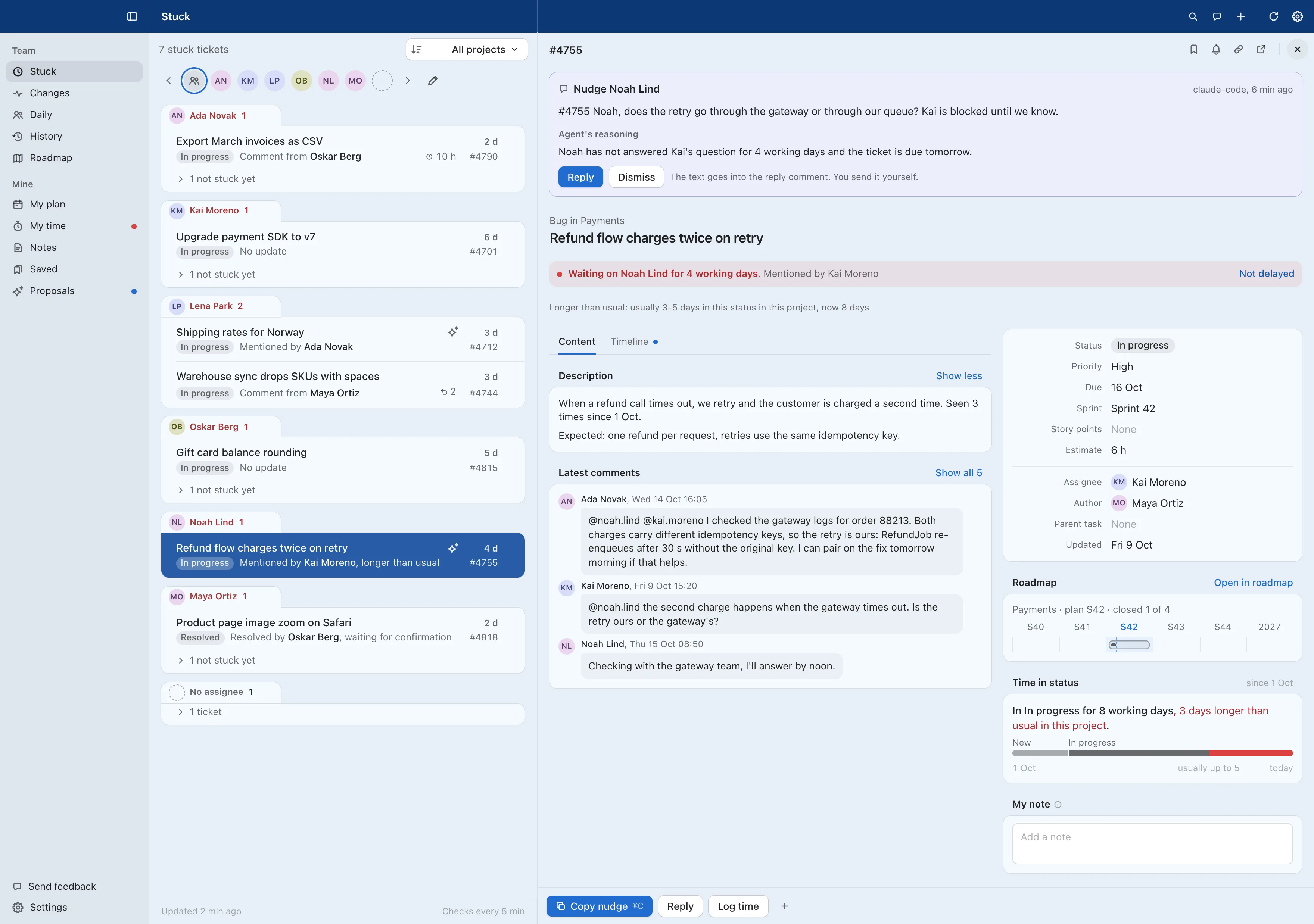
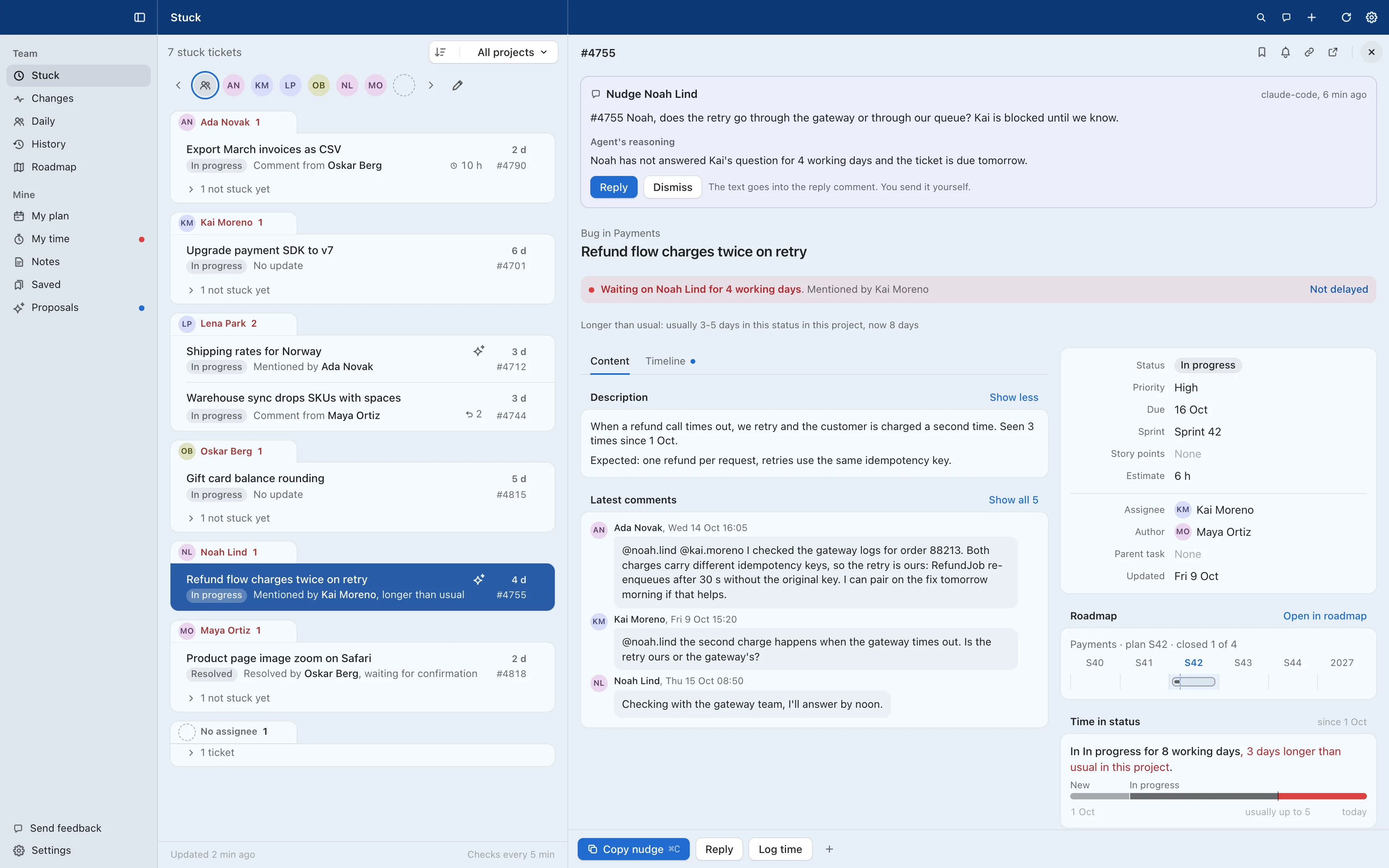
 Turndesk plans your day and shows which team tickets are delayed and who they wait on.
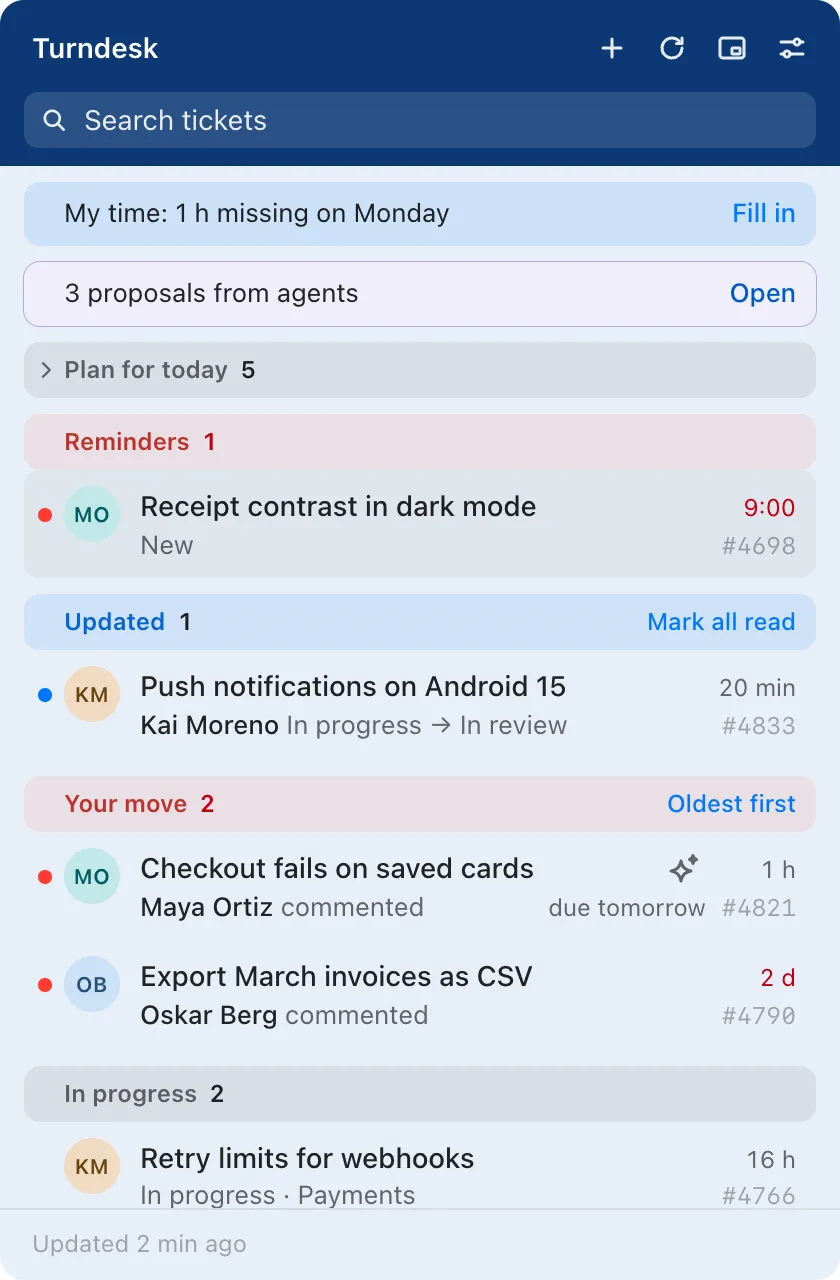
 Turndesk Tray sits in the menu bar. When a ticket comes back to you, it sends a notification and shows a red dot.
For macOS, Windows and Linux. Works with Easy8 (formerly Easy Redmine) and Redmine 5 or later.*
Less time checking Easy8. More time on the work.
With Easy8 alone, a ticket that comes back to you waits until you check Easy8 in the browser, spot it among notification emails or someone pings you. Turndesk tells you when it comes back, so you open a ticket when there is something to do in it.
| Task | In Easy8 alone | With Turndesk |
|---|---|---|
| What needs you today | Open your saved filters, then ticket after ticket, to see who wrote last. | Your move lists it, oldest first, and Turndesk Tray sends a notification and shows a red dot when something comes back. |
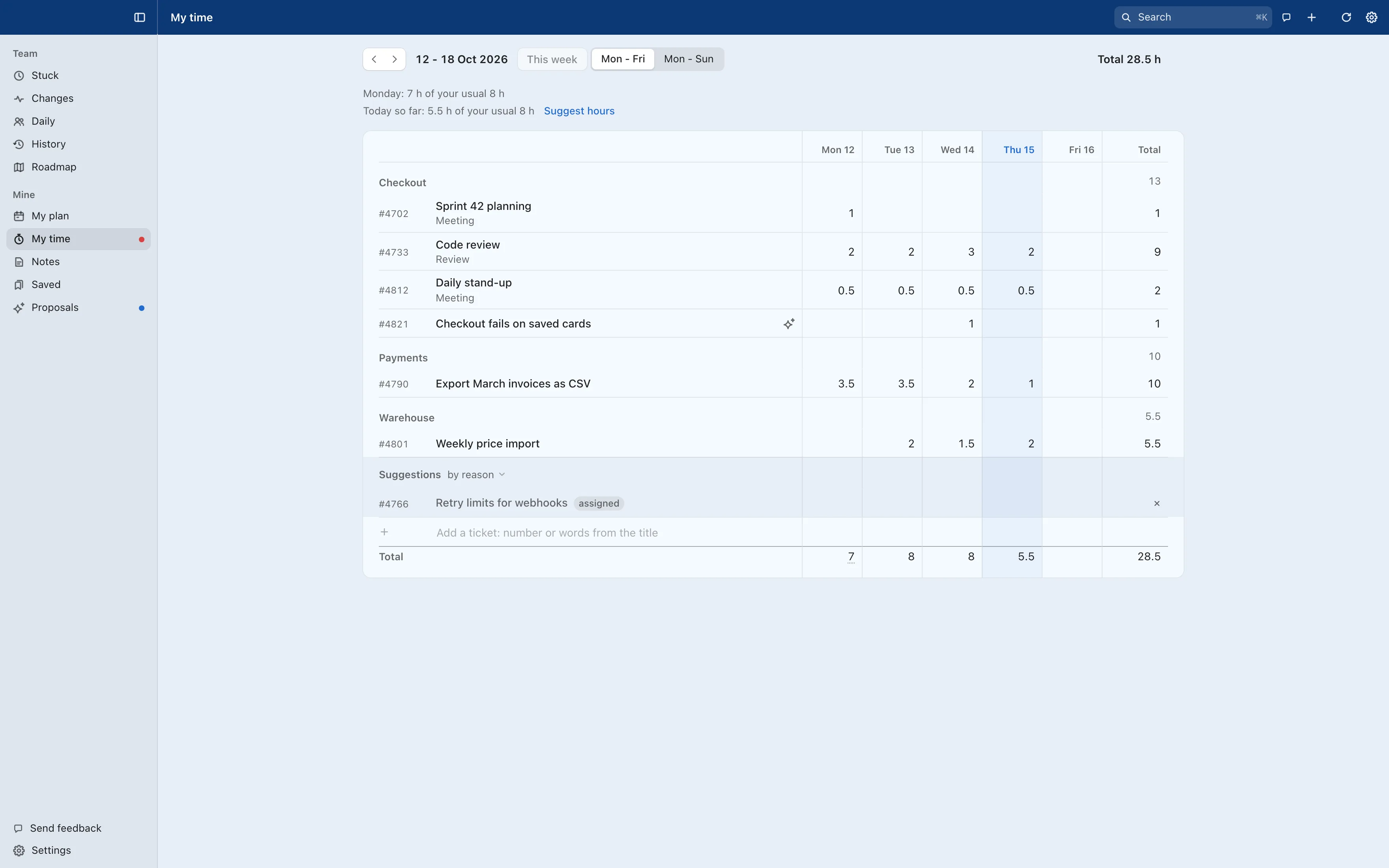
| Logging time | Open the ticket and the time form, pick the activity, type the hours. For every ticket, every day. | My time suggests hours from your day. You log a suggestion with one click. |
| A ticket with no progress | Spot it first, check the history to see who it waits on, then write the message. | Stuck shows who it waits on and for how many working days. Copy nudge gives you a ready message to paste. |
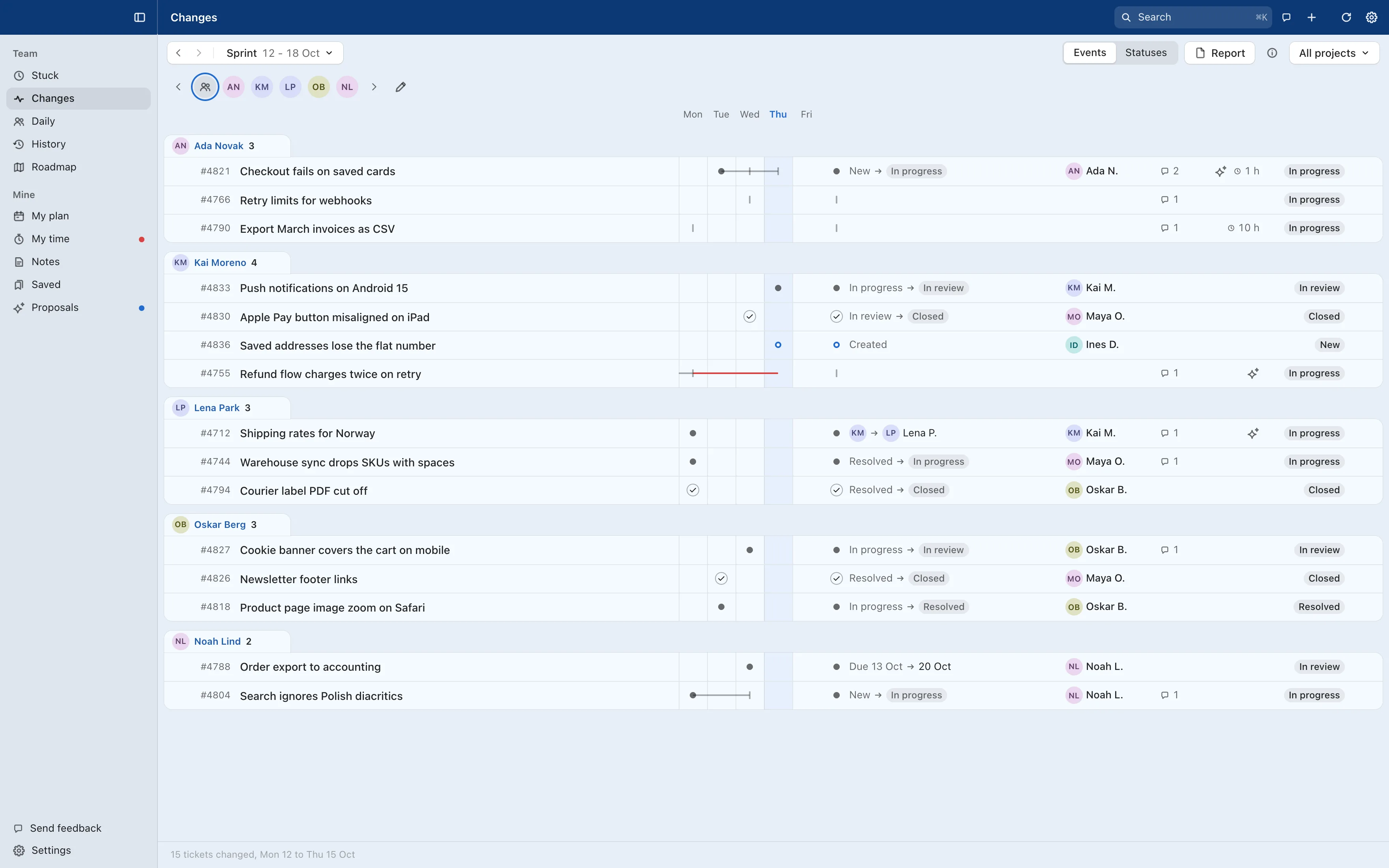
| The stand-up | Filter by each person in turn and read through their tickets. | Daily goes person by person: what changed since the last one. |
| The weekly summary | Collect by hand what closed and what changed status. | Changes has the whole week, and Report turns it into a summary to copy or save as PDF. |
Example: a ticket comes back to you
30 min unnoticed
Maya sends the ticket back at 10:42 and you see it at 11:12. That's the average wait if you check Easy8 eight times a day.
3 min
By 10:45 at the latest you get a notification and a red dot. One click opens the ticket in Turndesk with everything you need to reply.
Every ticket is a conversation. Turndesk knows whose turn it is.
Turndesk works out whose turn it is from the last comment, the status and the assignee, and moves the ticket to the right section. Follow one ticket through a week, or find out what else Turndesk works out on its own.
-
Maya Ortiz opens #4821 and assigns it to you.
It lands in Your move with a red dot.
-
You ask which cards fail. The ball is with Maya now.
The ticket moves to Waiting for a reply. No dot, no ping.
-
Maya answers: Visa cards saved before 2025.
Back in Your move, with one notification. A busy day gets at most six.
-
You push the fix and resolve the ticket.
Now it waits for Maya to accept it. Turndesk will flag it if that takes longer than usual.
-
Maya closes it.
It leaves your list. Nothing for you to clear by hand.
Turndesk
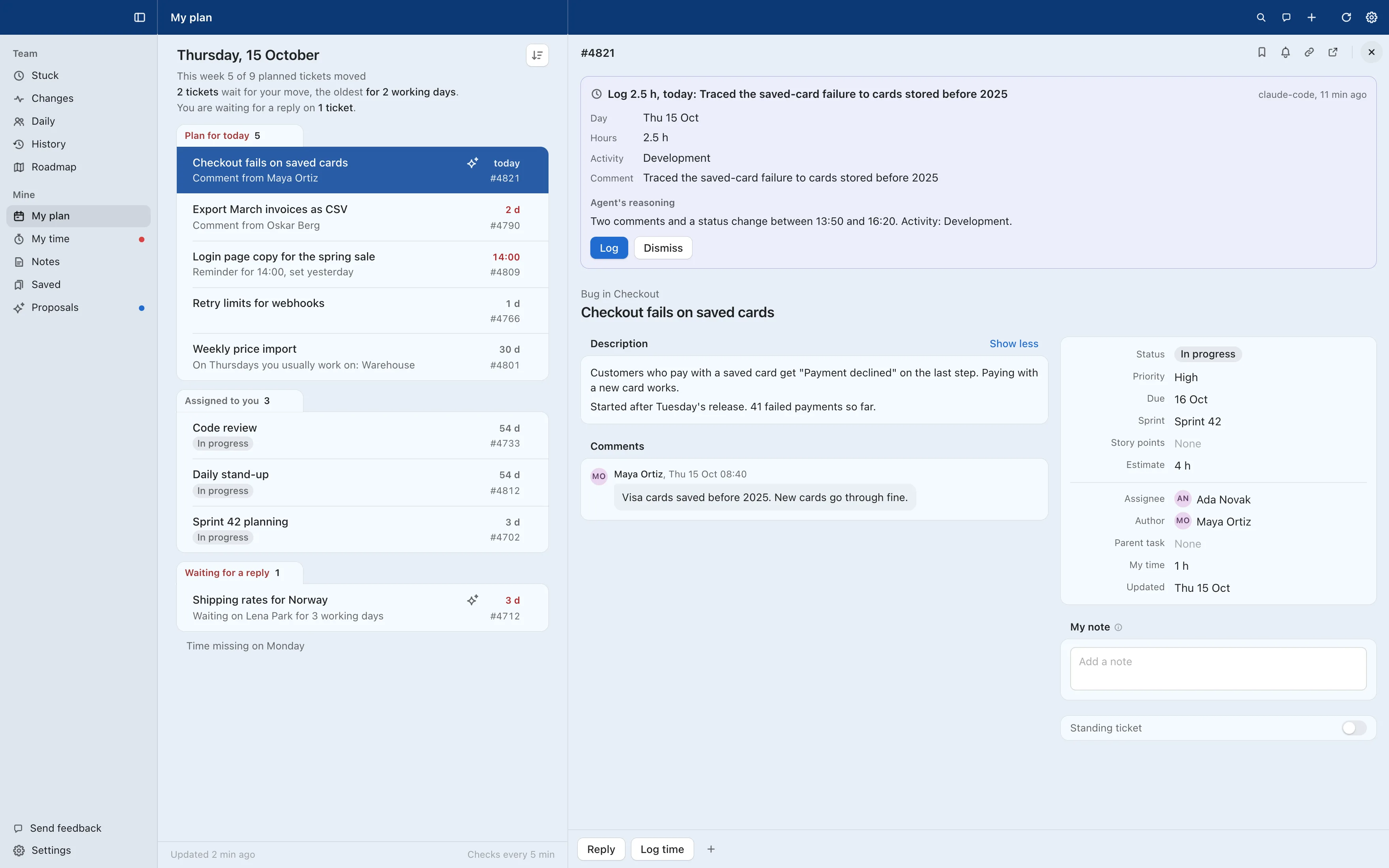
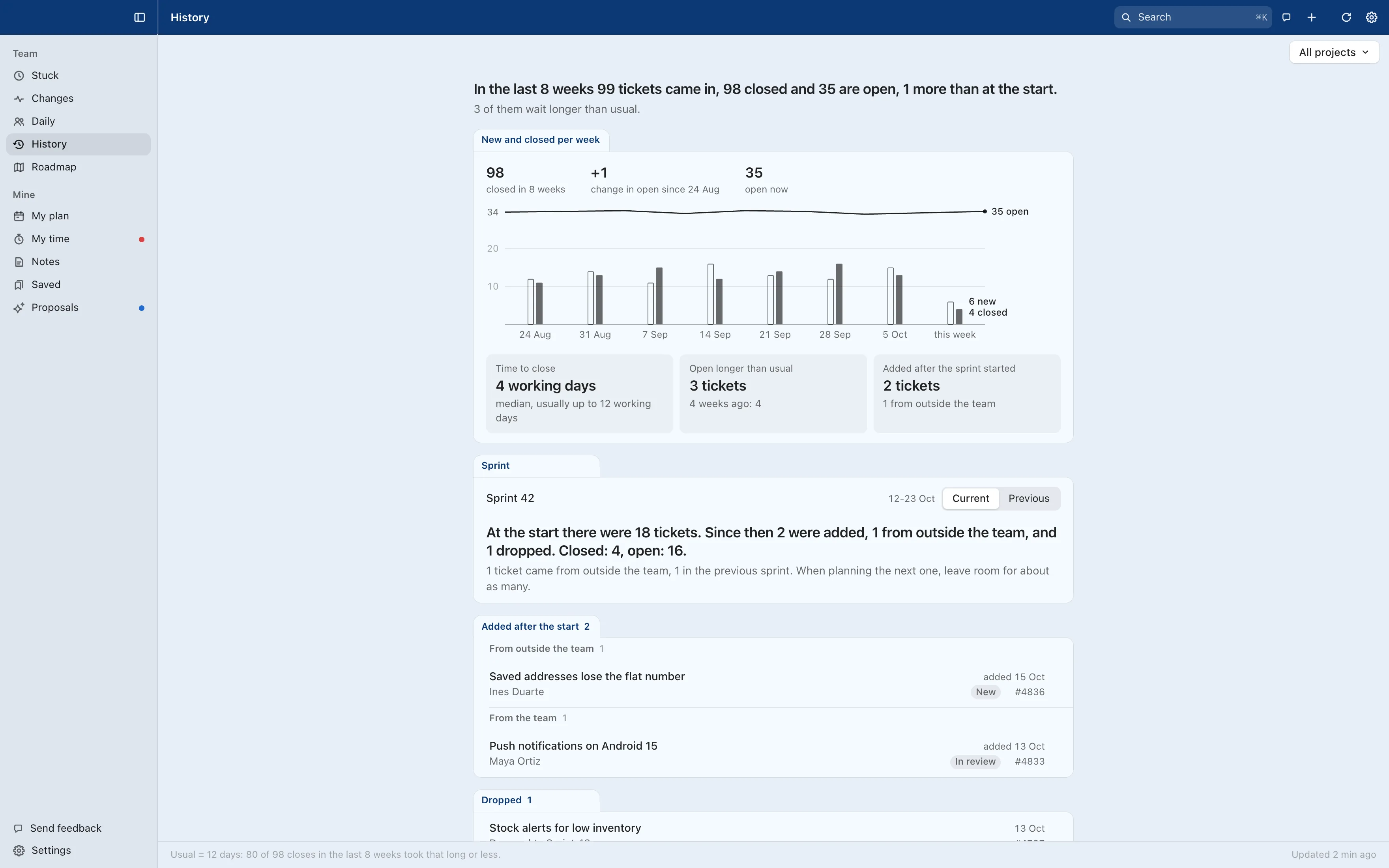
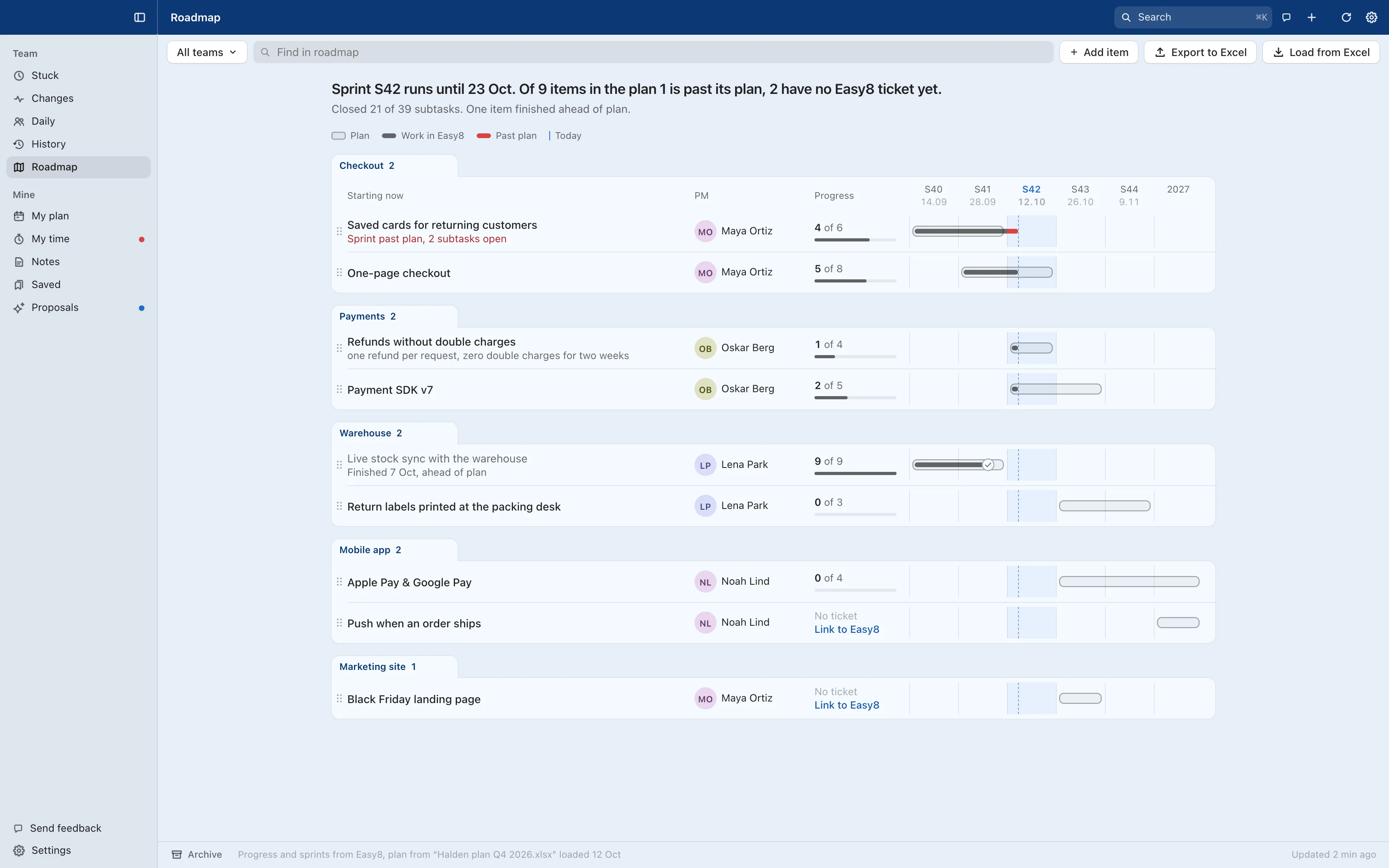
The main app, for everyone on the team. Your plan and your time, and next to them the whole team: what is stuck, what moved and how the last weeks went.
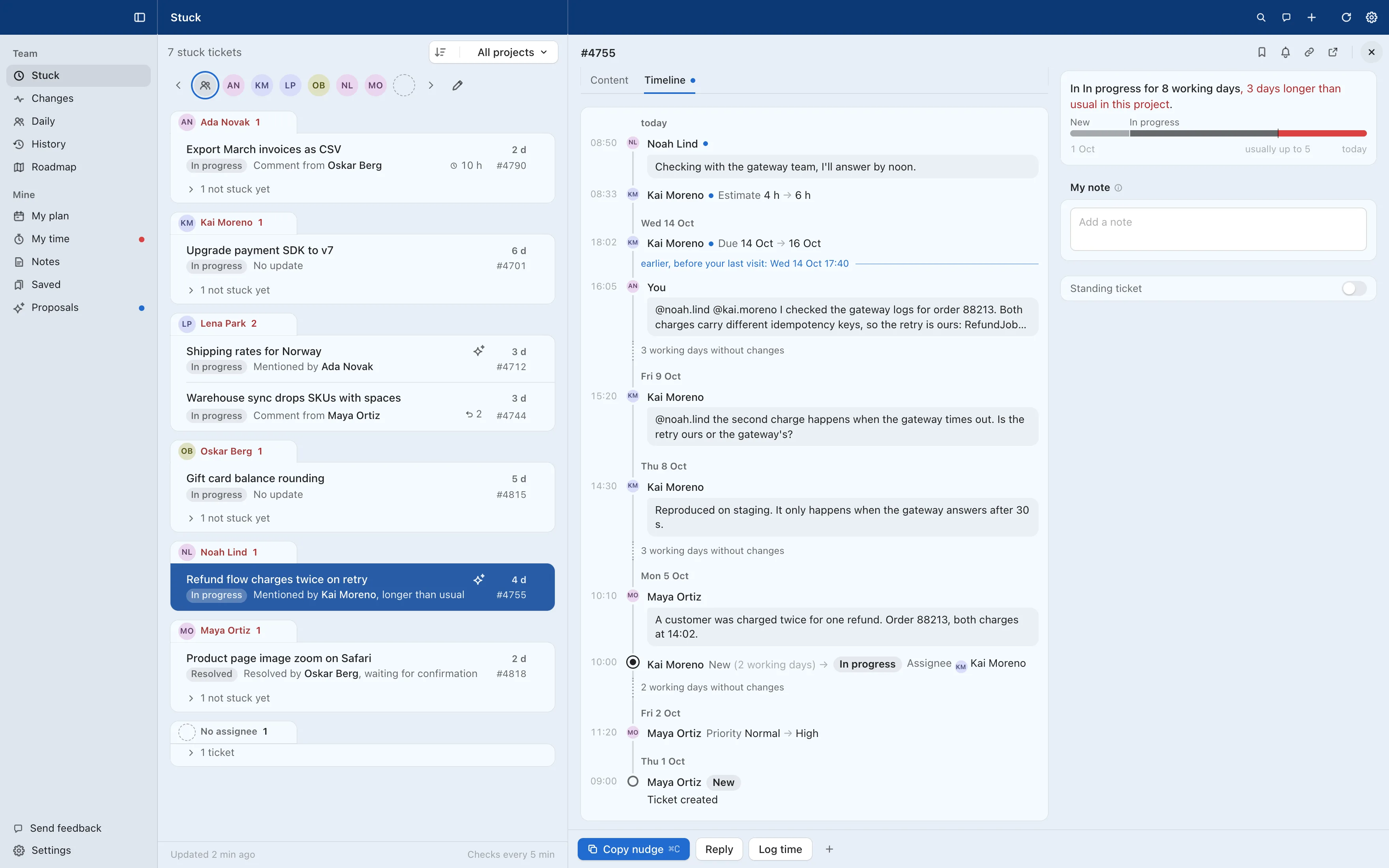
What each button does
Team views
Stuck, Changes, Daily, History and Roadmap. Daily is the stand-up, one person at a time.
Sidebar and toolbar
On every ticket
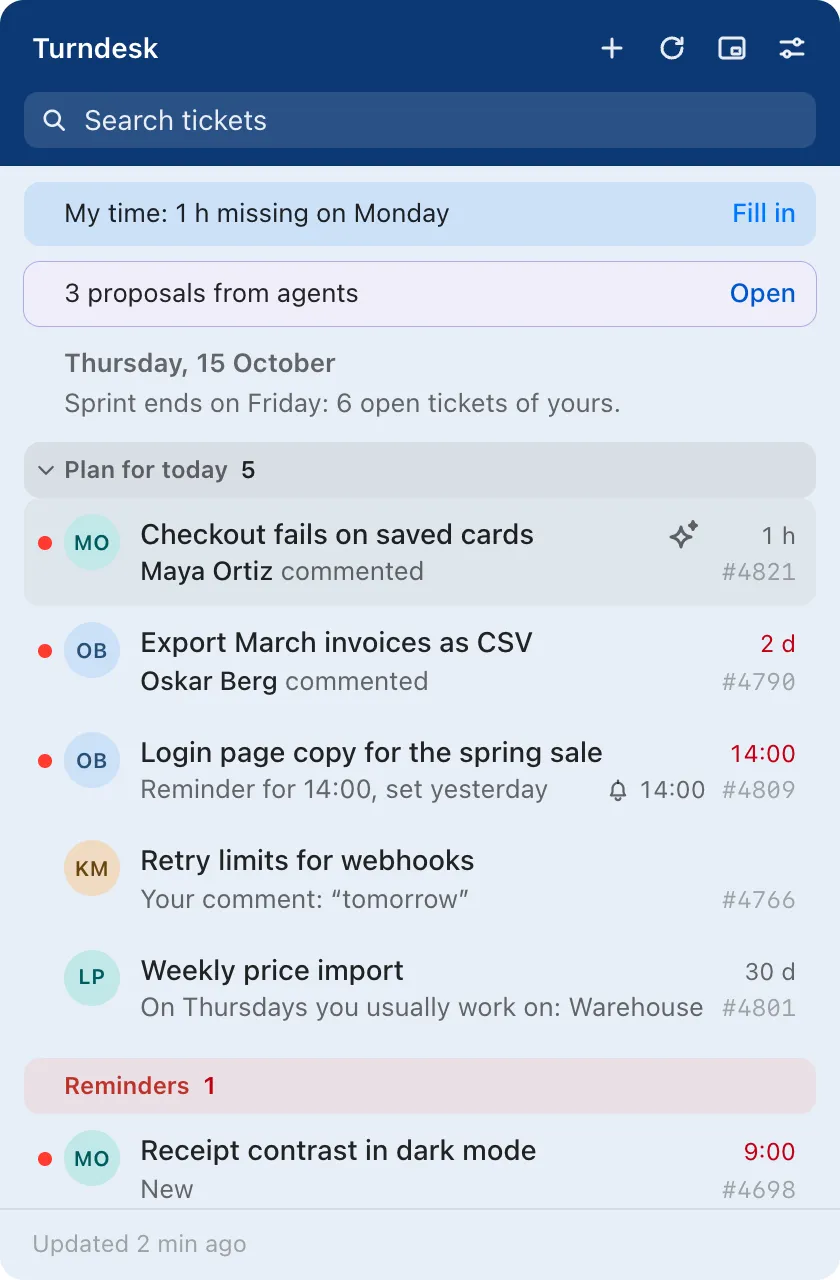
Turndesk Tray
The companion in the menu bar, or the system tray on Windows and Linux. It watches your tickets all day, also when Turndesk is closed.
- Plan for today
- The most urgent comes first: missed and today's due dates and higher priority, then whatever has waited longest on you, reminders and due dates for the next two working days. Free slots fill up from your own habits, and each row gives its reason, such as “On Thursdays you usually work on: Warehouse”.
- Updated and Your move
- New changes stay blue until you read them; the Mark all read button clears them. Your move is red and sorts oldest first, so nothing old hides under something new.
- Not today, hand over, not my move
- Put a ticket off until tomorrow, hand it to someone or mark it as not your move, in one click. When you hand a ticket over, the Tray suggests whoever usually takes that kind of work.
- Hours and proposals at the top
- “My time: 1 h missing on Monday” opens your timesheet with suggestions. “3 proposals from agents” opens them in Turndesk.
- Reminders
- Remind me later on any ticket. When the time comes, the ticket waits at the top in red with the time next to it.
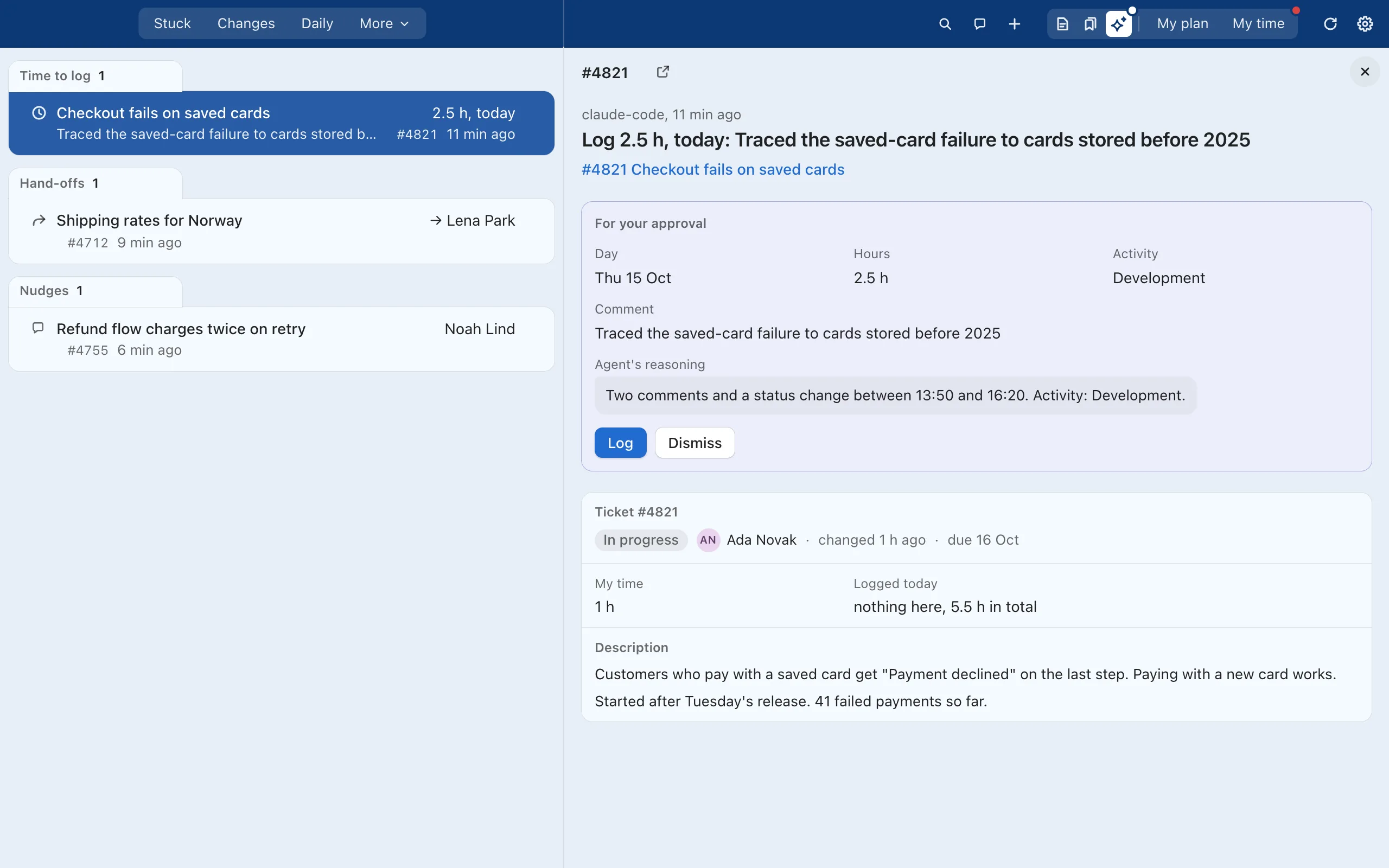
Your AI agent proposes. You decide.
Turndesk runs a local MCP server, so Claude Code, Codex or any MCP client can read your tickets and suggest hours, estimates, hand-offs or replies. Every suggestion waits in Proposals until you accept it. Nothing reaches Easy8 before that. When Claude is active, and what it sees
> log my time for today on what I worked on
e8 - my_day (MCP)
e8 - propose_log_time (MCP)
You have 2.5 h left today. I proposed 2.5 h on #4821: “Traced the saved-card failure to cards stored before 2025”. Accept it in Turndesk.
Your tickets stay with you.
There is no Turndesk account, no analytics and no telemetry. The apps talk straight to your own Easy8 or Redmine server and keep everything else on your computer.
What stays on your computer
- Your tickets, notes and reminders
- What the apps learn to plan your day
- Agent proposals and AI chats
- Your Easy8 or Redmine API key, in the system keychain
- Your licence key
Remove the app and its folder, and it is all gone.
What leaves your computer
| Your Easy8 or Redmine server | Ticket requests with your API key. Changes only when you click. |
|---|---|
| updates.turndesk.app | An update and licence check every 6 hours. Updates are signed, and we keep no access logs. |
| date.nager.at | The year and your country once a month, for public holidays. You can turn it off. |
| Anthropic or OpenAI | Only when you ask, with your own key. By default, names become Person-1, Person-2. |
What an AI model sees
Kai MorenoPerson-2 asked Lena ParkPerson-3 to review the refund fix before Friday. LenaPerson-3 can test it with card 4111 1111 1111 1111[card].
At the default access level, names become Person-N before the question reaches the model. Phone numbers, card numbers, IBANs and secrets are removed at every setting. The answer comes back with the real names restored.
From install to your first tickets
- InstallA normal installer for macOS, Windows or Linux. No admin rights needed on Windows.
- ConnectEnter your Easy8 or Redmine address and paste the API access key from My account.
- DoneYour tickets appear. Updates install themselves when you are not using the app.
Pricing
One licence covers Turndesk and Turndesk Tray, with every feature. Invoiced to your company once a year.
Up to 5 people
Free
Every feature of both apps, no licence key needed.
6 to 99 people
€12 per person per year
The first five people on your team in Turndesk are free. You pay from the sixth.
100 people or more
€1,200 per year
One price covers everyone in your company's Easy8 or Redmine, however many people that is.
Prices exclude VAT. Write to kontakt@codcube.pl and we will send a licence key for your whole team, for a trial first if you like.
Questions
Does it work with our self-hosted Easy8?
Yes. The apps talk to whatever Easy8 or Easy Redmine address you enter, cloud or on your own servers, as long as the computer can reach it and the REST API is on.
Does it work with Redmine?
Yes, with Redmine 5 or later, in the cloud or on your own servers. Your Redmine admin turns on the REST web service once, under Administration, Settings, API. Turndesk reads comments written in Markdown and sends yours as Markdown too. Parts that need Easy8 modules, such as sprints, story points, attendance and comment reactions, stay hidden.
Can it change anything in Easy8 on its own?
No. Comments, time entries, status changes and hand-offs are sent only when someone clicks. AI agents can only propose; a person accepts each proposal.
Can we use it without AI?
Yes, and that is the default. AI features appear only after someone enters their own Anthropic or OpenAI key or connects an MCP client. Every case is listed on When Claude is active.
Do we need both apps?
No. Turndesk works on its own; Turndesk Tray adds notifications, the red dot in the menu bar and a quick look at your tickets. One licence covers both.
Does Turndesk rank or score people?
No. It shows tickets that wait and where they wait. There are no per-person speed scores, leaderboards or productivity numbers, by design.
Which languages does it speak?
English and Polish. Public holidays follow your country, or your own calendar.